
Many data practitioners and programmers struggle with applying formatting rules consistently when writing code. They often rely on formatters to keep their code easily readable for an outside party. SQL codes also appear messy without proper formatting. Without proper formatting, the complexity and length of SQL can overwhelm someone going through thousands of lines of code for troubleshooting purposes. SQL codes often involve many clauses, subqueries, joins, etc, due to which it’s often recommended to simply use a query formatter in SQL server systems. These tools will make your SQL queries much clearer. Data practitioners and developers can quickly grasp the logic and intent behind it this way. Just like SQL, other languages also benefit a lot from proper formatting.
For instance, C++ needs proper indentation and spacing to make one block of code distinguish itself from another block (e.g., loops and conditional statements). The strict indentation rules in Python enforce readability; you may also employ additional formatting practices (e.g., consistent naming conventions) to enhance readability. If you’re writing SQL queries, you should remember these best practices to make sure that your code doesn’t confuse fellow developers:
Use consistent indentation (e.g., 4 spaces) to denote subqueries or derived tables
Insert line breaks after major clauses (e.g., SELECT, FROM, WHERE, GROUP BY, ORDER BY)
Capitalize SQL keywords (e.g., SELECT, FROM, WHERE) to distinguish them from identifiers
Use spaces around operators (e.g., =, <, >) and after commas to improve readability
Use consistent naming conventions for tables (e.g., camelCase or underscore notation)
Align similar elements like column names or join conditions to make the query more visually appealing
Include comments to explain complex logic or non-obvious parts of the query
What Is a SQL Query Formatter?
A query formatter in SQL serversystems is simply a tool that formats your SQL code. You can also find it under the names “SQL beautifiers” or “SQL prettifiers.” An SQL formatter applies the correct sets of rules to your unformatted SQL queries. So, it’ll apply indentation, line breakings, spacing, and capitalization consistently throughout your unstructured queries. That’s how your queries will become easily readable. SQL formatters can be online tools, desktop applications, or plugins for IDEs and text editors.
Why You Need a SQL Formatter
“...all the databases should follow the same date format. If one database has the data organized in MM/DD/YYYY format and the other database has the data organized in DD/MM/YYYY, then this can threaten the data accuracy.”
When it comes to data accuracy, formatting plays a key role in it. Using the correct formatting guidelines will make your queries more effective. So, here are a few reasons why you must use an offline or online SQL query formatterwhen writing SQL code.
Readability: SQL queries with proper formatting are easier to comprehend. Imagine you are trying to read a huge chunk of code and nothing in it makes sense. Formatting helps you make your code immediately readable the moment someone looks at it. Data practitioners and Developers easily understand the intent behind your code with proper formatting.
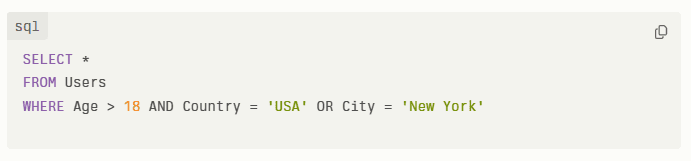
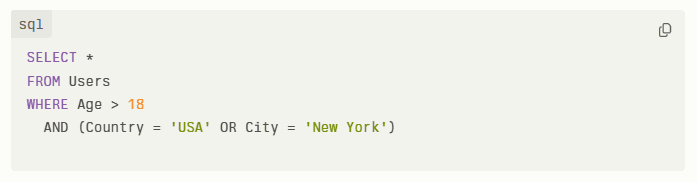
Collaboration: Correct formatting ensures that all team members are on the same page when working on a project. Imagine your fellow developer doesn’t follow the formatting rules that you’ve set and you have to spend some time trying to understand it. Consider this brief example. In the poorly formatted version, it's unclear whether the OR condition applies only to the Country check or to the entire Age>18 AND Country=’USA’ condition. The properly formatted query indicates that the OR condition applies to both Country & City.
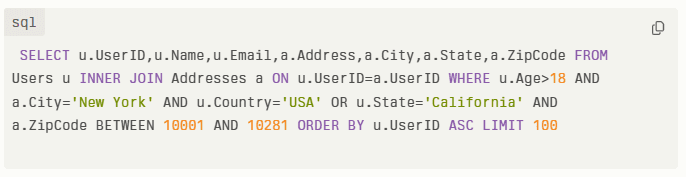
Debugging: Debugging becomes easier with proper formatting. For instance, the image pasted below shows a block of SQL code with absolutely no formatting followed at all! A developer trying to debug this code will have to first make sense of what it means. They will have to apply the right formatting rules by adding parentheses, line breaks, spaces, and line breaks.
Performance: With proper formatting, a developer can highlight areas of improvement. For instance, they may point out redundant clauses or inefficient joins in the query.
Customization: Many formatters support various SQL dialects and ensure compatibility across different database systems. Formatting tools often provide customization options to tailor formatting rules according to specific coding styles or project requirements.
How Does a SQL Server Query Formatter Work?
Analyze Your SQL Input
The formatting tool will parse your submitted SQL code into its constituent parts, such as:
Keywords
Identifiers
Syntax elements
It’ll break down your SQL query into a structured representation for the formatting tool to make sense of in the first place. The tool then identifies the SQL dialect being used (e.g., SQL Server, MySQL, PostgreSQL) to apply the appropriate formatting rules
Apply Formatting Rules
The next step is simple, i.e., the formatter will apply the right formatting guidelines to make your SQL query easily readable. Here’s what the formatting tool will do:
Indentation and spacing rules will be applied (e.g., aligning clauses, subqueries, etc.)
Capitalization of SQL keywords as per the chosen style to give your SQL query a very uniform look
Inserting line breaks and wrapping long lines to prevent horizontal scrolling
That’s how your SQL query will take a shape familiar to most data users and developers.
Give Formatted Output
After applying the formatting rules, the tool generates the formatted SQL query directly on your SQL editor / IDE.
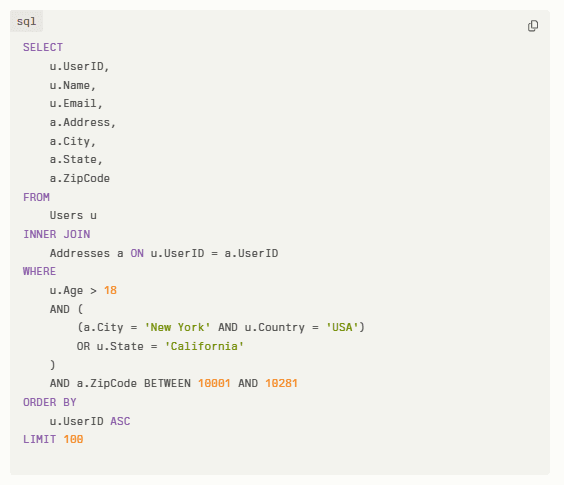
This final output is displayed in a structured, readable format, which can be used by database clients or code editors. For instance, we showed you the picture of an unformatted query in the section on debugging. Here’s a properly formatted version of the same thing:
Best SQL Formatter Tools for Data practitioners and Developers
Are you looking for the best online SQL query formatter for your coding efforts? We’ll create a list of 7 best formatter tools for you to choose from:
When it comes to SQL query formatting, there’s no tool better than Sherloq. It will provide assistive functionality to improve your query writing experience.
With Sherloq, directly on your IDE / SQL editor you can:
Easily beautify or format the query
Write CTEs easily
Define your static piece of code
Apply the WHERE filter on a specific field
Auto-generate documentation
All of this happens directly on your SQL editor / IDE.
That’s why Sherloq should be your go-to query formatting tool.
SQLinForm
The second place is claimed by SQLinForm. It’s available in both free and pro versions. You can either use it as a standalone tool or integrate it into IDEs like VS Code or DBeaver. Offering over 100 formatting options, it supports many databases. It is highly customizable and integrates well with popular development tools, preferred by professionals and teams looking for a flexible and customizable SQL formatting solution.
Instant SQL Formatter
Instant SQL Formatter is yet another amazing SQL developer query formatter to use. You can use it for free online. It doesn’t only format SQL codes but also converts them into HTML. That’s how you can easily share your SQL queries with people on online blogs/forums.
It can support translation into various programming languages like C#, Java, and PHP as well. Developers who need quick formatting and conversion options for sharing or integrating SQL code with other languages will rely on this tool.
ApexSQL Refactor
ApexSQL Refactor is an amazing plugin for SQL Server Management Studio (SSMS). It’s very famous for its effective formatting capabilities. Also, it’s easy to use and highly customizable. If you’re an SQL Server professional who needs a robust, customizable formatting solution, you’ll find this an easy-to-integrate formatting tool. Choose this SQL server query formatter pluginfor your formatting needs.
Poor Man’s T-SQL Formatter
Poor Man’s T-SQL Formatter is an open-source tool available as an SSMS add-in. You can also use it as a command-line tool or Notepad++ plugin. It offers cross-platform compatibility and can customize formatting rules easily. Also, it supports different SQL dialects. That’s why devs who work with T-SQL and prefer open-source solutions can rely on this formatter.
DBeaver SQL Editor
DBeaver SQL Editor is a great tool within the DBeaver database client. It offers multi-database support and very advanced formatting capabilities. Also, it’ll combine formatting with many other database management features. Database administrators who prefer a comprehensive tool for both formatting and database management.
SQL Prompt by Redgate
It’s a commercial tool that gives you access to a free online SQL formatter. With Redgate’s SQL Prompt, you get:
Advanced code refactoring
Style parameter file upload support
Maintaining coding standard efficiency
Developers who value consistency and advanced refactoring capabilities, particularly in SQL Server environments, prefer using this tool.
FAQs - SQL Server Query Formatter
What is the best way to format SQL?
The best way to format SQL is to use uppercase for keywords, lowercase for identifiers, adding line breaks after major clauses like SELECT, FROM, WHERE, etc., and consistent indentation. It will make your SQL queries easily readable.
What is the structure of a query optimizer?
A query optimizer is a database component. It determines the most efficient execution plan after going through your SQL code by considering factors like indexing and data distribution. It offers modules for parsing, optimization, plan generation, etc.
What is proper formatting for SQL for readability?
Proper SQL formatting includes rules like capitalized keywords and consistent indentation. Also, you will align similar elements, ensuring that your queries are easily understandable. You’ll use visually distinguishing factors to make clauses or subqueries appear differently from each other.
Is there an SQL formatter Chrome extension?
Developers often use tools like SQLinForm or integrate formatters into IDEs, e.g., Visual Studio Code for efficient SQL formatting. These tools will give customizable formatting options to hone your code’s readability for enhanced collaboration and quicker debugging.